Best 5 Smartphones [ Rs 13,000 to Rs 20,000 ] – India

The smartphone market is full of handsets of the mid-range segment. Almost every smartphone manufacturer has introduced handsets in the range ranging from Rs 13,000 to Rs 20,000. The best camera quality is given in any of these phones, so there is a better processor and software for smooth performance.

But there are some of these phones that come true on the definition of premium-end smartphone. Many times, users are confused with these phones, which is better for them. As a result, I have listed 5 best smartphones for you which are available in less than Rs. 20,000 in India (September) .

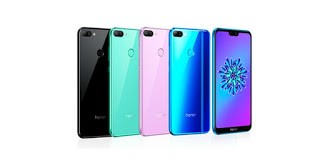
#1 : Honor Play
Price: Rs 19,999

The price of the 4 GB RAMvariant of this smartphone is Rs 19,999and the price of 6 GB RAM variants is Rs 23,999. This phone has a 6.29 inch Full View FHD+ display. This phone is equipped with the Kirin 970 AI (Artificial Intelligence) processor. It has 64 GB of internal memory, which can be increased to 256 GB via microSD card.

This phone supports Android 8.1 Oreo. For photography, it has 16 megapixels + 2 megapixel dual camera. At the same time, the 16 megapixel selfie camera has been given with Artificial Intelligence features. 3750 mAh of  battery is provided at back of this phone .


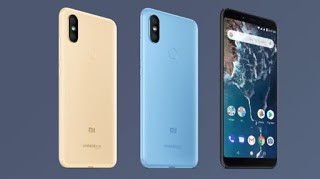
#2 : Xiaomi Mi A2


Price: Rs 16,999

The great thing is that it works on stock Android 8.1 Oreo. It has a 5.99″ full HD Plus display .This phone has a dual rear camera. Its first sensor is 20 megapixels. At the same time, the second sensor is of 12 megapixels.

Speaking of selfie camera, it has a 20 megapixel Sony IMX376 sensor. This phone is equipped with the Octa-Core Qualcomm Snapdragon 660. It has a quick charge of 4.0 technology. There is a battery of 3100 mAh is provided to power up the phone .


  #3 : Nokia 6.1 Plus


Price: Rs 15,999

Nokia 6.1 Plus comes with 5.8 inch Full HD Plus display. This phone is equipped with Qualcomm Snapdragon 636 processor . It has 64GB of internal storage, can be extended to 400 GB via microSD card. In addition, this phone works on stock Android 8.1 Oreo.

The phone has a dual rear camera of 16 and 5 megapixels for photography. It is a dual-depth camera that is equipped with Bokeh effect. The phone has a 16 megapixel front camera for selfie, which is equipped with f / 2.0 aperture and 1-micron pixels. To give power to the phone, 3060 mAhbattery is provided with Quick Charge 3.0 technology.

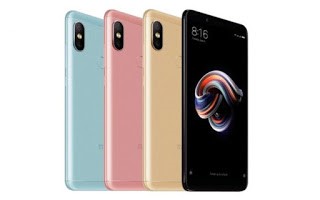
#4 : Xiaomi Redmi Note 5 Pro 


Price: Rs. 14,999

It has a 5.99 inch display. This phone is equipped with Qualcomm Snapdragon 636 processor. It has 4 GB RAM / 64 GB storage variant (Price: Rs 14,999) and 6 GB RAM / 64GB storage variant (Price: Rs 16,999 ).

To give power to the phone, a battery of 4000 mAh is provided. For photography, a 5-megapixel Samsung sensor with a vertical dual camera on the rear and a Sony IMX 486 sensor of 12 megapixels. Its front camera comes with a 20 megapixel Sony IMX 376 sensor.


    #5 : Moto G6


    Price: Rs. 13,999

    The phone has a 5.7 inch Full HD Plus display. This phone is equipped with Qualcomm Snapdragon 450processor. The phone has 3 GB and 4 GB RAM. Also 32 GB and 64 GB of storage is provided.

    For photography, a 12 megapixel + 5 megapixel dual camera setup has been given in the phone. Also, 16 megapixel selfie shooter has been given. To give power to the phone, 3000 mAh battery is provided.

    Hope you find this article helpful. Now you knew that which smartphone is the best ! If you have any further confusions , share in comment box below. Thanks !!

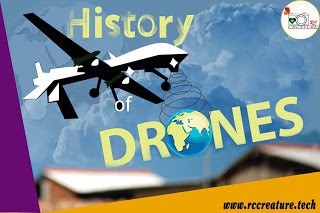
    History of Drones : All You Need To Know About it !

    When the word DRONE hit a normal person mind it suddenly clicks to something like a WEAPON up to some extent it is true that a DRONE can be a Weapon but in this 21st century the drone is not a weapon but it is a toy too and you can now even buy drones at a cheap price.

    Did you think ever that from were this unmanned or you can say non-pilot technology comes from and how old it is?
    Would you believe if I say that the first unmanned aerial vehicle was created almost 170 years ago?
    Yes, you read it right it’s 170 years old technology, in other words, you can say that it is the technology from the previous century (It sounds crazy).

    First, for those who don’t know, it’s necessary to learn that the word “drone” simply refers to an “aerial vehicle” that is unmanned.

    Also Read :  [Free] Top 5 Best 4K Video Downloader for Youtube (2019)

    Unmanned means that the pilot does not sit or stand inside the vehicle itself.
    Well, it is true that the first drones were seen in 1839 when Austrian militants bombed the city of Venice with unmanned balloons loaded with explosives.
    Some of those Austrian Balloonswere successful to hit the enemy, but most of them failed back and blasted the Austrians’ own lines, so the method did not become widely used due to this first failure.
    The discovery of flying aircraft changed everything for manned and unmanned vehicles.
    Modern History Of Military Drones :
    UAV technology enhanced completely after World War II (which saw a number of technological improvements as we all know) and into the Cold War as well.
    But these are so big in size t see and are very expensive in the price as well. New discoveries in manned aircraft like the Flying Fortress and the SR-71 Blackbird.
    Both the US and the USSR used unmanned drones to some extent to spy on each other during the War, but the specifics are still divided and the leaked reports are often inconsistent.
    The modern drone battle started in the earnest in 1982, when Israel organized the use of battlefield UAVsbeside manned aircraft to clean the Syrian fleet with very minimal losses. The Israeli Air Force used military drones to recon the enemy’s location, to block transmissions, and to act as decoys that would prevent the loss of pilot life.
    The technology was nothing different, but the IAF(Indian Air Force) decided out how to use drone technology in a way that would make operations more successful from the past. The United States spent tens of millions of dollars on new drone contracts in 1984.
    Modern History Of Commercial Drones :
    According to a report, the history of non-military drone use began in the earnest in 2006.
    The drones are used for disaster relief, border surveillance and wildfire fighting, while big organizations started using drones to inspect pipelines and spray pesticides on farms.
    As unmanned aerial vehicletechnology enhanced in the military sector, those same technological advances could be used in the private sector.
    You may be astonished to hear that recreational drone use actually only took off very recently, and it’s grown fast.
    2006 was the first year that the FAAcirculated a commercial drone license. They issued a tally of two of these licenses a year for the next eight years – that was all that was demanded.
    Then, in 2013, Amazon CEO Jeff Bezos proclaimed that the company was considering applying drones as a delivery method.
    In 2015, the FAA ( Federal Aviation Administration ) issued 1000 drone licenses, a figure which more than tripled to 3100 licenses in 2016 and which has maintained to grow in the time since.
    What is the Future of Drones ?
    Well, the technology is developing day by day which leads to a brighter future for the drones. Numbers of different companies are working for the betterment of the drones and making it easier and better than ever.


    Even the drones taxis are introduced which needs no driver for it and after that, in Future, you can see much more advancement in the field of drones.
    Conclusion:
    The journey from the balloons filled with explosives to the flying taxis in the air. I have really enjoyed writing this article and hope that all of you also liked the interesting history of the drones.
    Let us know in the comment section if you like the history of drones.

    Everything You Should Know about Data Security and Encryption !

    We’ve entered a time when the conveniences of widespread connectivity, including the cloud, have put us at more risk than ever of getting hacked. When data does fall into the wrong hands, the consequences can be devastating. High-profile data breaches and ransomware attacks have organizations and individuals on red alert for the best ways to safeguard their data and networks, both now and for the future.
    If you’ve been putting off adopting encryption as a part of your security policy, delay no more. Here’s a guide to the science of encryption, and how you can begin implementing an encryption strategy today.

    What is Encryption?

    Encryption is a process that works in a way to protect your private data from the prying eyes. Today, encryption is known to most of the users (tech-savvy) as compared to a few years earlier where nobody is able to grasp this terminology. Back in the days, encryption was compared with the likes of password protection, file locking tools etc.  But soon with the passage of time, it was made clear that encryption stands tall against these mediocre safety options.
    But know that encryption was not a straight put success. It was never an overnight attempt on making this piece of security that stands so tall. It was created after a hundreds of failed attempts and even more renewals to make amendments to create the final product.  The cycle of encryption as it started and what was it called in the beginning of its time are as follows

    TripleDES:

    The concept was to replace the DES with Triple DES algorithm. It was considered as an option as hackers had identified how to defeat the former one. In the industry, there was a time when Triple DES was the most preferred standard and most commonly used algorithm.  This type of encryption uses 3 separate keys (56 bits each). When combined, the total length of the key ranges to 168 bits however, experts claim that 112-bits is rather feasible. Regardless of being eliminated, Triple DES still works in the sectors in the financial services and other similar industries as an encryption solution.

    • Also Read :How to Improve Your Brand by Marketing Company Toronto ?

    RSA:

    RSA is an asymmetric algorithm unlike Triple DES as it uses a pair of keys. You use your private key to decrypt message and the public key which you use to encrypt the information. All in all, it makes it difficult for the prying eyes to proceed any further into your stuff.

    Blowfish:

    This type was created only to replace DES where blowfish divides the information into a total 64 bits and each one of them is encrypted separately.  Blowfish stands out for its quick speed and as claimed, it has no competition in speed. But the vendors however took complete advantage of it being freely available in the public domain.  You can find this type of encryption in e-commerce platforms for safe payments which is quite flexible and easy to use.

    Twofish:

    Twofish is an encryption algorithm that uses up to 256 bits in total length but only one key is required as a symmetric method. Known for its speed, Twofish is used for not only software environments but also for hardware related uses. Twofish similar to Blowfish is a free tool to use due to which, it is heavily bundled in programs of encryption.
    • Also Read : 102 Productive Apps to Change Your Life in 2018 !

    AES:

    Hands down on this one, no questions asked. This type of encryption uses efficiently 128-bits form, 192, 256 bits for solid encryption reasons and even more. AES stands for advanced encryption standards is by far the most reliable form of encryption algorithm that so far hasn’t seen any limitation of lacking behind. The creators have made the claim of it being unbreakable.

    What lies in the future of Encryption?


    Since there is no stopping to the prying eyes, the time is ripe for you to surround yourself with the above mentioned security options. We do consider these types of algorithms and encryption software for windows to be safe but know that it is only a matter of time these hackers find a way out of these standards. The future however holds the concept of honey encryption that would render hackers helpless by serving false/fake data for every wrong guess or attempt of entering the key code. Such type of technology is planned to slow down the prying eyes but forcefully hides the right key in a haystack. This method would surely slow them hackers but for how long, we are not sure.
    • Also Read :Top 5 Best Car Insurance Companies in India in 2018
                  Top 25 Best easy Ways to make Money Online easily and quickly without Investment from Home 
                  How to protect your Smart Phone from Theft or Loss ? RC CREATURE Tips

    Top 5 Best Ways to Fix Black Screen Issue in Android Smartphones (2018)

    Whether you have a new phone or an old one, there is no guarantee that the phone will never be bad. Many times the touch of the phone’s screen does not work, so sometimes the problem of blackout is found in the screen.


    Often people mention screen black out in their phones. On the go, the screen suddenly turns black and after a while it gets cured. This is called black out. This problem is common in Android phones, but people are scared when the screen is blackout and the phone reaches the service center. However, if you try a little bit, it can cure itself. Let me tell you that there may be many reasons for the screen blackout and it can be corrected too. So, let us know the solutions of this screen black out problem !!
    Avoid Old Apps :
    Apps are the biggest cause of screen black outings. Some newer or older apps are not compatible with the phone’s OS. In such a situation, they tend to be troubled repeatedly. If your phone is blackout frequently, first uninstall apps that have been installed recently. With this, if the phone is okay then it is good or else start your phone once in safe mode.
    Safe Mode ?
    First of all, the phone has to be closed. Then press and hold the power button. As soon as the phone starts to turn on, you have to press the volume up and down buttons together. It will start in safe mode. The way to start in safe mode can be different. You can find it on the internet. If the phone is working correctly in safe mode, then understand that there is a problem in the app, so uninstall some apps and restart the phone, it will be correct.
    Check Battery Health :
    In today’s Uni-body phone where you can not change the battery yourself, many times the problem of screen blackout is due to the battery and not even know. So if you checked the app then check the battery now. If the battery does not come out, then check the body of the phone to see if the battery is not flowering. If everything looks okay, even if the screen is blackout at any time, then you can take the help of an amp appto check the battery. This app will tell your phone’s battery health.
    Check MicroSD Card :
    Sometimes the MicroSD card in your phone is causing the problem. In the card,  you transfer music, photos, videos etc. from any other phone or PC and the virus comes by itself and this virus starts spoiling your phone. At the same time, if the card is corrupt or damaged for some reason, the phone’s screen will be black out. In such a case, if you have placed the card in the phone, remove the card and restart the phone. Your phone will work correctly .
    • Also Read : Get Known Top 5 Best App Lockers for Android Phones in 2018
    Factory Reset :
    Not only by card, but by surfing the Internetor by data transfer anytime the virus can come in the phone, which can cause problems in your phone. If the phone’s screen is getting blackout and you think it is a virus problem, then it will have to do factory data resetor hard-boot. This will fix your phone. If your phone is outdated and you have not reset it for several months, then there may be a problem with the screen blackout. There are also problems like this due to the phone’s memory being full. In such a way, delete the cache memory from your phone and remove the non-working apps and data. This will solve the problem. If the phone is reset to factory data then it is much better.
    Keep Updating Software :
    Your phone comes with OS and App updates, but you ignore those updates. Let you know that these updates are meant only to eliminate the bug. Also, new features are added together. If you have not updated your phone for months, then update it soon. If the screen is blackout due to the application or phone software, the problem will be resolved.
    Guys, it was a short tips on screen blackout problem which are commonly seeing on our Android smartphones specially. Hope you like this . Let me know if you have faced this problem and what did you do for this in comment box . 

    Top 5 Best Budget Smartphones [ U-Rs 10,000 ]

    Day by day, new smartphones are launching in India. Smartphones are like a lifeline of human now-a-days. So, it’s too difficult to choose the best smartphones in any category like budget category , mid-range category or flagshipcategory. But you don’t worry, I am here to help you in purchasing the best phone if you are searching a budget smartphone which costs below Rs 10,000. 


    In this article, I have explained all details in brief like specs, features, and price of the best top five android smartphones which are available in India right now ( September) . You just scroll down this page and watch only the bold letters to acquire the main knowledge about the best android phones under 10k. And here, I have only listed 5 smartphones ( RealMe 2 , Redmi Y2, Honor 7C, Infinix Hot 6 Pro & Redmi 5) which are the best phones in Indian market. Then, let’s scroll down this page now !! 

    #1 : Xiaomi Redmi Y2

    Price : Rs 9,999
    Specs & Features :
    This smartphone has a 6.0 inch HD+ display. This phone comes with Snapdragon 625 with octa core processor. This has equipped with dual rear camera of 12 MP primary and a 5MP depth sense camera. And in front, it comes with a 16 MP camera with flash light. Its battery packed with 3080 mAh which backs up a full day . Its Android operating system runs with Android Oreo . Luckily, it has face unlock and fingerprint unlock at back side .
      

    #2 : RealMe 2

     Price : Rs 8,990
     Specs & Features :
    It has a 6.2-inch (1520 x 720 pixels),18:9 FullView  display with Corning Gorilla Glass 3protection . Its processor is 1.8GHz Octa-Core Snapdragon 450 with 14nm Mobile Platform with Adreno 506 GPU . It comes with two variants i.e, 3GB/4GB RAM with 32GB/64GB storage . 
    It runs with ColorOS 5.1 based on Android 8.1 (Oreo). It has a dual 13MP rear camera with LED flash, f/2.2 aperture & Secondary 2MP camera with f/2.4 aperture. And for selfie, 8MP front-facing camera, f/2.2 aperture, 1.12μm pixel size has given. It has also Fingerprint sensor & face unlock. For power, it has a massive 4230mAh battery . 

    #3 : Infinix Hot 6 Pro 

     Price : Rs 7,999
    Specs & Features : 
    The Infinix Hot 6 Pro comes with a 5.99″ bezel-less display. Its camera has 13MP +2MP dual rear camera & a 5MP selfie camera. It processor comes with Snapdragon 425 chip. It has 2GB of RAM, 16GB  internal storage , & with  a massive 4000mAh battery. It also runs with the latest Android 8.1 Oreo Operating system.

    #4 : Honor 7C 

    Price : Rs 9,999 
    Specs & Features : 
    This smartphone comes with 13+2 MP dual camera at rear which allows you to shoot a better bokeh shot . And also you can get a 8MP single camera for selfie shooter. The smartphone runs with Android Oreo with Qualcomm Snapdragon 450. 
    Its display comes with 5.99″ HD+ and a 18:9 aspect ratio. It packs with a 3000mAh batterywhich can give you a full day backup. In this price segment, you will get 3GB RAM and 32GB internal storage. And also it has Face Unlock featureand a Fingerprint scanner at back which can give you a better security.
    • Buy Here :  Honor 7C (Amazon)

    #5 : Redmi 5 

    Price : Rs 7,999
    Specs & Features : 
    Xiaomi Redmi 5 features a 5.7-inch display with HD+ resolution along with support for 18:9 aspect ratio. It is powered by Octa-Core Snapdragon 450 processor & along with Adreno 506 GPU. It comes with two variants i.e,  2GB & 3GB of RAM and 16GB & 32GB of internal storage respectively. It runs on Android 7.1.2 Nougat operating system with MIUI 9 on top of it . It is backed up by a 3200mAh battery.


    Conclusion : 

    Stop stop ! Now this article completed . Hope, now you can able to select the best smartphone under 10000 rupees. Or, if you are satisfied with these, then publish a comment below, I will guide you to buy the best budget android smart phone available in India ( September) . Thank You ! 
    • Also Read :  102 Productive Apps to Change Your Life in 2018 !

    What is the top 5 best Important features of Android 9 (Pie) ? Google Android P Launched !

    Google has launched Android 9 operating system after the Android Oreo 8.0. Let’s remind you that Google’s CEO Sundar Pichai had named this operating system as Android P in Google I / O 2018. Now this operating system has been renamed to Android 9 Pie. This operating system has many Artificial Intelligence features. This new operating system will roll out from August 8 or 9.


    Android 9 or Pie is currently available for a few select devices. This operating system will be rolled out first to some select device.
    So, before knowing its top features , let’s know which device will get this update early after rolling out . 


    Here are the Selected Devices : 

    Google Pixel Device: If you have a Google pixel device, then you will get the update of this operating system first. This operating system has rolled out to Google’s device.

    OnePlus: Android 9 or Pie will also be rolled out for OnePlus5, OnePlus 5T and OnePlus 6. By the end of this year, it will be rolled out for OnePlus 5 and OnePlus 5T. However, an update for OnePlus 6 will be released in the next few weeks.

    Nokia: Nokia’s device Nokia 6.1 and Nokia 8 are part of the Android One program, this update will be released by November 30.

    Samsung: Samsung’s premium smartphones will also roll out this operating system by the end of the year.

    Other smartphones: If you have Xiaomi’s Android One device Mi A1 and Mi A2, then you will get an update of this operating system soon. In addition, this operating system will be rolled out in Vivo X21 and Sony Xperia XZ2 too soon.

    Are you using any smartphones among this ? Let me know by commenting!!

    Top 5 Best Important Features of Android 9 (Pie):


    Performance (Gesture): 

    First of all, we talk about the look or performance of this operating system. Speaking of its gesture, the Android device’s home button is replaced by a small handle. Also, its app sweeter is horizontally scrolled just like the iPhone X. This means that this new feature Android users will definitely be attractive.

    Google’s main focus is to make smartphone management more convenient for users through new features.

    Adaptive Battery & Brightness Feature:

    In this new operating system, Google offers adaptive batteries and adaptive brightness features. Emphasis has been made to improve battery life of smartphones through Adaptive Battery Features. The new operating system will also work to improve the CPU performance with the smartphone’s battery life.

    The New Google Assistance :

    This new operating system will be equipped with Google Assistance. Through which you can communicate with your smartphone as human beings. Google has added 6 new voices for this.

    Time Limit Feature in Apps:

     Through this new Google operating system, you will be able to set the time limit for the use of the app. If users spend more time on an app, then the operating system will tell the users that you have spent so much time on this app that will give users the flexibility to make time management.

    DND Mode:

    By the way, do not disturb(DND) mode is already in Android Oreo 8.0, but this new operating system has been made even better. Through this mode you can star your contact. None other than starred contacts will neither be able to call you nor will you be able to send a message.

    Apart from this, the app’s notifications will not be available in this mode. If you are on vacation or in a meeting, only after having enabled this mode, only the calls needed will be available to you.

    Conclusion : 
    To conclude this article, I want to say one thing  that Android 9 (Pie)will be the successor of 2018 end. It’s awesome features . I am waiting for this update in my mobile , wish my smartphone support it !

    Ok, friends, in this article I shared a little bit news on Android 9 . If you really enjoy this article by reading, then please share your thoughts in comment box below. And yes, if you want to read topics on your topic , then suggest me that topic. I will sure try to write a better article on your topic
    . Thank You ! 

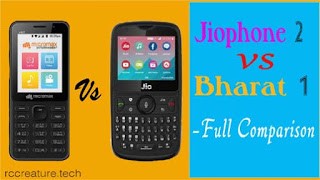
    Micromax Bharat 1 vs Jiophone 2 : which is the best 4G Feature Phone for you ? See Full Comparison Here !

    Hi all, if you are looking for a feature phone between Jiophone 2 and Micromax Bharat 1, then this article is best for you. Read all specification comparison between Micromax Bharat 1 and Jiophone 2 . Let’s start !

    Full Comparison Between Jiophone 2 and Micromax Bharat 1 :


    Design and Display :


    JioPhone 2 has been designed like the BlackBerry Curve Design. The phone has a 2.4-inch display. It has 4-way navigation and Qwerty keyboard. At the same time, a 2.4-inch vertical screen has been given in Micromax Bharat 1. It has been given the T9 Alpinium keyboard. There is also a 4-way navigation button in it.

    In Design and Display segment, clearly the winner is Jiophone 2. Because the phone has wide display and Qwerty Keyboard.


    Camera :


    Both the phones have a basic and analytical camera. Talking about the back panel of the phone, JioPhone 2 and Micromax Bharat 1 have a 2 megapixel rear camera. Apart from this, the VGA front camera has been given in both the phones.

    In camera segment,  JioPhone 2 and Micromax Bharat 1 are both winners.

    Processor & Storage :


    Micromax Bharat 1 smartphone is equipped with Qualcomm 205 processorand 512 MB RAM. It also has 4 GB internal storage which can be expanded up to 32 GB via MicroSD card. At the same time, JioPhone 2is equipped with 2.1 GHz dual-core processor and 512 MB RAM. It has 4GB of internal storage which can be expanded up to 128 GB via MicroSD card.

    In Processor & Storage, JioPhone 2 is clearly winner.

    Software :


    Both phones work on Kaios. But there is a slight difference in both. JioPhone 2 has an app store with Geo Apps, which includes JioMoney, JioMusic, JioCinema and JioTV. At the same time, the BHIM UPIand BSNL Wallet apps in Bharat 1 are pre-loaded.

    In Software case, JioPhone 2 is the winner.

    Battery & Connectivity :


    2000 mAh battery is provided in Jio Phone 2 and Micromax Bharat 1. Talking about connectivity, there are three main factors in JioPhone. Bharat 1 offers Wi-Fi, Wi-Fi hotspot, Dual 4G, VoLTE, Bluetooth and MicroSD card slot. In addition, additional features such as NFC, VoWi-Fi and GPS have been provided in JioPhone 2.

    Here in this segment, JioPhone 2 is also the winner with additional features.

    Price :


    The price of Micromax Bharat 1 is Rs 2,200. With this, Monthly Bundle Plan of Rs. 97 is available, under which unlimited voice callsand data are available. Speaking of JioPhone 2, it costs Rs 2,999. Jio is offering three prepaid plans. Among them are many features including voice calls and data.

    My Opinion :

    The price of Micromax Bharat 1 is low and it comes with LTEsupport. Kaios Apps has been supported in this. At the same time, there are some main features in addition to all these JioPhone 2. JioPhone 2 has a QWERTY keypad with a widescreen display. Additionally, additional features like NFC, VoWi-Fi and GPS have been provided. So, Jiophone 2 would be better if you were looking for a best feature phone with 4g .

    Hope, this will be help you a lot. If you have any queries or questions , comment below, I will sure reply you quickly. Thank You !!!


    How to Improve Your Brand by Marketing Company Toronto ?

    Individuals who are running a business want to reach as much they can. Individuals who are not trained with proper branding knowledge cannot promote the information at that level. Without appropriate strategy and expertise, it is impossible to make a strong branding. Maximum numbers of people are now using onlineplatform for promoting their company through search engine platforms. 

    Be it a small or significant all business people now want their company’s presence via online. There are so many companies who are currently available in the markets that are offering you an online platform for amazing results. Our marketing company Toronto is one of the renowned firms who aptly understand your need and profile then only move ahead towards media planning.


    Your website is your presence online – make your business Big with Marketing  Company Toronto
    When and if you are planning to be on a platform that is live 24X7 – this must be catered in a separate and strategic manner. Clients and target audience often are gathering enough information from the web presence and finally understand the need and other details easily. Then they move ahead to plan the purchase or contact as per requirement.
    Let us discuss some of the basic features that we can offer once connected:
    •  Marketing ethics: – We are not using any spamming methods to create an instant promotion. We understand the value of your site presence online. Thus we generate and promote your own business in an organic manner. We use the maximum time for initial ranking just via opting for PPC and CPC methods that are not at all harmful for your website.
    • Experience: – WFM are working in this field since long. Our expert professionals are trained and skilled from the industry that delivers the best possible need of the things that is well needed to brand your products and services online.
    • Also Read : 102 Productivity Apps to Change your life


    • Guaranteed placements: – Ranking in the top position of the search engine page is very much difficult. After getting a certain rank, maintenance is much more difficult. Our expert’s employees make you rank on the top pages and maintain that with assurance. Our techniques of doing SEO would surely beat your competitors and increase your position.  
    • Referrals: – before dealing with us check our existing clients. We can gladly handover the reference details that we have successfully done. You can get a chance to check our live works too. Once satisfied then only opt for our service that is often customized only for you. 
    • Progress reporting: – we share a report to you before commencing the action. Our experts would give you the updates report time to time while your work is constant with us. These would help you to understand of our work and your ranking position simultaneously.
      Hiring a marketing company can cost you more. However, without the current marketing strategy, you cannot make your brand strong. The marketing company Toronto would adequately guide you. Spending money without any result can harm your company. Consult with us now and promote your business with the experts.                                                                           
      About The Author : 
      We at WFM, provide all digital marketing solutions at one place. We are located in Toronto provide website development, web design and SEO services.


    Fortnite Tips for Beginners : The Most Advanced Tips and Tricks (2019)

    Although there is still a lot to be able to get closer to its final version, ‘Fortnite‘ is already among us and the first impressions that the Epic game has left us invite us to think that we are going to spend many hours with him.

    Fortnite Tips for Beginners : The Most Advanced Tips and Tricks (2019)


    If you think that may be your case, this guide for beginners can help you a lot during the first hours. Here, I will share some fortnite tips for beginners and some fortnite advanced tips and tricks of 2018.
    In it we collect the best tips to collect resources, get the best character, find treasures and survivors, learn how classes work and evolution and, of course, make your backpack is filled with valuable loot in the form of weapons and plans.
    Some Previous Advice :
    First let’s see some tips for those who just start playing, since the game is not focused too much on giving us previous advice and to avoid many of them can make the game in the long run gets a bit uphill.
    Very attentive to the tutorial. You will learn the basics and letting things happen can give you problems later on. Take it easy.
    Take advantage of everything you can unlock at the beginning. You may not know very well what it is for during the first hours, but you will appreciate having the most unlocked while you are gaining the first points and completing missions.
    The first missions are key to see how you like to play before specializing in a particular class.
    Take advantage of the little difficulty of the first missions to experiment and explore.
    Head to the loot. Getting resources is the key to the game, so collect as much as you can and you’ll worry after what it’s for.
    Take your time on each mission. It may be that the objectives for time get your attention, but you will gain much more by exploring the map and looking for resources and chests. 


    Also Read : [Tested] Cheats and Secrets of Hustle Castle (2019)

    Getting Resources :
    Collecting everything you find is the easy part, but getting the most out of the collection of resources is not something that you learn the second. Here are some tips to find what you are looking for and not have your backpack full of trash.
    Fortnite Tips for Beginners : The Most Advanced Tips and Tricks (2019)


    You will never have wood, metal or stone left over because they will be crucial to create structures, so do not miss the chance to break a huge tree or rock if it is close to you.
    Everything you break will give you resources, so dedicating yourself to destroying a whole house if you have nothing better to do, is not necessarily a waste of time.
    Be careful to break objects that contain something inside. First collect what there is and then break it, otherwise you will lose that hidden loot.
    Learn to master the weak points of objects, if you attack there you will do more damage and get resources will be easier and faster.
    If there are two objects nearby, place yourself in a position where you can attack the weak points of both easily and you will accelerate the process.
    Stroll through the caves and look everywhere. In them are very valuable resources, but they can be hidden in the ceiling, the walls or the floor, so you will probably have to create small structures that will bring you closer to them.
     

    Also Read : Best 10 WordPress Plugins for blog (2019)

    Find Treasures :

     
    Without doubt the best way to find high-level schemes and resources, but require some attention and exploration, so it is recommended that in each mission you try to find treasures to move forward more easily.
    You can find them in the form of pirate chests or big and small safes. Very attentive to these treasures because they contain very valuable loot.
    Fine-tune your ear, as each time you pass close to one you will hear a kind of angelic sound, as if a miracle were hiding nearby. If you hear it, there is something nearby, start looking.
    Keep in mind that many of these treasures may be behind fake walls, so if you do not find anything on a first walk around the area, start destroying things.
    Normally they hide in the highest or lowest part of a building or cave, so you have to dig in the basements or create structures to climb to a roof and start chopping to make your way to them.
     

    Find Survivors :

    Although initially only limited to give you gifts, later the survivors will become a valuable currency that you can become heroes or allies, so better to get used to the beginning to find them.
     When passing next to one of them, it will be marked on the map. Take a look at it from time to time in case you missed one.
    Like treasures, you can also listen to them if you are close, in this case in the form of cries for help.
    If you think it’s close and you do not see it, look for areas with food and resources, they usually hide there.
    If in spite of this you still can not find it, start breaking walls and floors, you may be trapped in a room without doors.
        Use the radars. You will find radars that will help you find survivors, but first you must build the building that supports them. It’s worth wasting time on it because, in addition, it will give you construction ideas.
    Manage Inventory :
    Your inventory is not infinite and, although we will not tell you to stop collecting resources, you should manage well for what and how you use them. These tips can help you.
        Do not accumulate things like a madman. It often happens with things like weapons and traps. The first recíclalas if you are not going to use them and, in the case of the second ones, take them to your main base.
         If you have more resources and you can take advantage of the plans to build weapons or traps, do it and go back to the previous step.
         If you have a plane, get rid of the weapons or traps that you can create with it. You will use it when you need it.
         Before a weapon is broken, recycle it to get objects.
    Use the object’s chest of your base to save those resources that you can not use at the moment or that pistol that you can not take advantage of yet.
    Attentive to the talents of the research tree, some will allow you to expand the capacity of your backpack or the chest of your base.

        To conclude, I shared some of fortnite tips and  tricks for beginners. If you have any doubts , share that in the comment box . Thank You !
    Tags : fortnite tips and tricks,fortnite tips,fortnite pro tips,fortnite,tips and tricks,fortnite battle royale,fortnite tricks,fortnite best tips

    [UPDATED] 102 Productive Apps to Change Your Life (2019)

    productive apps
    If you want to change or make your life into productive, then here I will share the top 102 productive apps to change your life. These productive apps are available in free or some paid, on both on iOS and Android . You can download these apps from your Google Play store or iOS store easily & quickly. So, without any late, let’s get started!!!


    (PS : You can directly download these apps by by just clicking on the title of the app.)


    Here are the Top 102 Productive Best Apps – RC CREATURE List :


    1. Forest :          

     The best planting app is forest. By it, you can plant seeds and grow a virtual forest. It also helps you avoiding obstructions while studying or doing work. From the launch of this forest app, there has been planted 1 million plus virtual trees. You can get this app in Android free & in iOS, you have to buy it.

    2. Tide :

             This app is a popular and very simple in interface. When you want to concentrate on something, then Tide app helps you pretty well. In this you can choose customize a mix of music and white noise or you may select any one of the fire options like ocean, rain, forest, meditation & coffee.
                If you want to download this app on your Android, then you don’t have to pay for this at where you have to buy this app in iPhone.

    3. Spark:

                Spark app is an e-mail app, only present in iOS devices. It helps you to read your emails by its “Smart Inbox”. It automatically detects important personal message, newsletter, notification etc.


    4. Microsoft’s Outlook :

                Like spark, it also does in reading your e-mails by its smart inbox. Its smart inbox shows your most important messages first and then other message. Outlook also integrates with calendar and other Microsoft Office apps. By which it is easy to set up meetings or edit a document.
    This app is available in both of Android & iOS with free of cast.


    5. Bluemail :

                The best e-mail reading app for Android is Bluemail. Till now, it has been got 4.6 out 5.0 in rating with 225K+ reviews in google play store. By this app, you can personalize your notifications & preferences for each & every e-mail account, customize swipe options, create groups for bulk e-mailing etc.
                It is available in Google play store at free.

    6. Todoist :

                Todoist features a ‘smart schedule’ by which you can get best suggestions for doing tasks. It is only possible for its machine learning. So, for this, this app has got Google play Editor’s choice app stamp. Yu can also access your notes & to-do-lists from any device and also it is integrated with third. Party app including Amaron, Echo, Google Drive, Google Home, Dropbox & more.
                It is available with free of cost in both iOS and Android.

    7. Trello:

                If you are planning for a trip or getting ready for a work presentation, you can assign works to yourself as well as other using trello app.
                Normally, Trello works on different projects at once. So, you can quickly & easily complete your tasks.
                This app is available in both of Android play store & iOS with free of cost.

    8. Squid:

                For copy and paste handwritten notes export notes as PDFs or images Squid app is the best app for these. And also gives you a freedom to write in smart phone as writing on paper. This app is available in both & in play store with free.

    9. Bear: 

                Bear app is helpful who are writing their notes on smartphone. This app helps you in saving time in writing. By its shortcuts, you can easily & quickly add links, italicize text and more. It is only available in iOS as free.

    10. LetterSpace:

                LetterSpace app is a paid app, available only on iOS. By using this app, you can easily move the cursor by swiping left or right on the keyboard bar above. It is very powerful tool in typing notes, editing texts on a smartphone.

    11. Strides:

                This app list you set four customization types of tractors. By using its tool like Target, Habit, Average, track your goals and build better habits. It’s free in iOS.

    Also Read : AC Market

    12. Habithub:

                Habithub app is a motivative app that motivate you to form habits & reach goals by focusing on streaks. You can visualize & complete your goals by using this app. This is a free app, available in Android.

    13. Evernote :

                Evernote is scanner app by which you can easily & quickly scan images, documents, notes and more. It can help you in creating new contacts on your phone. It is available in iOS as free.

    14. CamScanner:

                Till now, Cam Scanner has been downloaded with over 100 million in more than 200 countries. This app is a popular Android app that helps you in scanning an image, note or documents like Evernote. This app especially available only on Android with free of cost. 


                “Comment below, if you are using this app in your smartphone. I have a big surprise for you. Comment fast!”

    15. Blankist :

                This app lets you show the key insights if bestselling nonfiction books into 15 minutes reads or audiobooks. It gives you a simple & more time-saving way to learn something new. This app also lets you to download the notes & read or listen to them offline. This app is available in both of iOS & Android with zero cost.

    16. Flipboard :

                The best way for time-saving and reading news on your choice is Flipboard. This app allows to create “smart Magazines” around the subjects you really love. Just select your passions & enjoy a curated collection of articles expert voices & other. You can also create a “custom Magazines” by adding individual stories. This cost free on both iOS & Android. Then, what you think, go and enjoy.

    17. IFTTT:

                “If This Then That” is known as IFTTT in short. This app allows you to connect your favourite apps by creating “Applets” that make your life easier & more productive. Let me explain that whenever you share a post on Facebook, it will share that on your Twitter as well if those both apps are connected via this. This app is available with free of cost in both iOS & Android.

    18. Awesome Note:

                This is especially available on iOS. This app for notes and to-do-lists. You can customize this app like backgrounds, colours, fonts etc. You also can set alarms for specific to-dos & calendar events as it is paid.

    19. Timeful:

                In this app you can do tasks, hobbies, habits & this suggests a suitable & best time for you to complete them. Then, you have options to accept or reject the tasks suggested. This is clever app that learns your busy & available times based on your input though it is not integrated with AI or machine learning.

    20. EasilyDo:

                Normally in iOS, there is not available any virtual assistant as Android have Google Assistant. So, if you need a virtual assistant in your iOS, then install this app, Easily Do. It helps you to connect your online services & finds tasks to complete. It is very easy in use and helpful. This app is specially built for iPhone users.


    21. Process Street:

                It is the best business process management software in the market. As it is simple and free way to manage your team’s workflows, procedures & recurring checklists. By it, you can communicate with your all employees and projects clearly.

    22. Zapier :

                This is likely as IFTTT. As Zapier automatically triggers action & transfer data in increasing with every new app that is added. So, it will help you in making your life more productive.

    23. LastPass:

                “Last Pass” is the abbreviation of “Last Password”. If you can’t remember your all passwords, then simply install this app. It automatically stores your all passwords even bank accounts in one place. Don’t worry about its security, this app itself is protected so you have to just remember one password.

    24. Timr:

                This app allows to track your work as whenever you go. Its basic version is free and is better than any browser. You can take it anywhere. So, by using this app, you can easily make your life productive & easier.

    25. Pomodoro Time:

                This is a free iOS app available only in iOS. This takes time tracking technique one step further. Its method usually consists of an initial 25 minute timer followed by a short break. It is useful as it is adjustable, track-able & can sync between all your devices.

    26. Google Drive:  

                The best cloud storage now is Google drive. It is accessible easily usable and can synchronise able to the cloud via your email. This app costs free as well as its all features. Docs, sheets, search, calendar are free. The documents produced from these apps are all easily shareable with colleagues & friends. And also it is a time-saving app.


    27. One Drive:        

                As like as Google Drive, One Drive is also a cloud storage. This app was developed by Microsoft Company. And also you can make your life more productive with one note, Microsoft Remote Desktop apps. All are easily synced on cloud systems such as one Drive & share point & easily shareable with others.

    28. OmniFocus :

                This is paid app. It is more helpful in making your life more productive. It is the most robust and full featured productivity apps in the market.

    29. Things:

                Things allows you to complete your to-dos and show you your calendar events. By this app, you can easily reschedule your plan if it changed suddenly. It is elegant in design & has most powerful features that helps you in making your life easier productive.

    30. 30/30:

                In this biggest platform, 30/30 app is a newbie. It incorporates lists & timing of tasks into an elegant & easy to use interface.

    31. Any Do:

                World’s best to-do list app is any-do-app. It helps you in maintaining it calendar, events, tasks & reminders. It looks a colourful that beautiful the eyes & also in your wallet. So without any hesitations, install it in your iOS if you are looking for.

    32. Pocketlife Calendar:

                It’s also an iOS app. This app is specifically designed to be stylish & looking beautiful. It is very easy to use. You can manage your life easily with different modern features. It allows you to personalize the interface display.

    33. Asana:

                Asana stores your works which have done today. It updates you your work that you follow daily. You can add tasks reminders & ideas quickly. It’s developed by a strong team committed to make collaborative task management a more efficient & effective experience.

    34. Flow Tasks:

                Flow Tasks app helps you in gathering your all works in one place. You can stay up-to-date with your teams work by it. And it also helps you in sharing ideas & discussing tasks with your teammates. It’s really a gorgeous collaborative task management app & very easy to use.
    35. Calendar:
                This app focuses on events that help you keep track of upcoming events, tasks & reminders quickly & easily. It’s available only on iOS. You can also organize your events & meetings.

    36. Clear-Tasks, Reminders & To-do lists:

                With over 2 million people are using this app. This app is an innovative list making app that relies on pinching & swiping to make thing happen. You can personalize this when you are inputting tasks to dos & reminders.

    37. Due:

                An amazing reminders app that helps you store and organize reminders of all types. Also in this you can customize your tasks & more. Go & download this app in your iOS.

    38. Checkmark :

                Chekmark lets you to mark your favourite locations that you would love to go daily. It helps in adding date & time based reminders faster than a calendar.

    39. Teux Deux :

                It is a simple and easy to use. It’s interface is quite simple. Its design is incredible. It you want to track & associate dates with tasks, then Teux Deux will be right app for you.

    40. Wunderlist :

                Another best task clearer app is Wunderlist. By it, you can also add reminders, due dates tasks, to-dos & more. It helps you in planning for work, home & everything in between too. And also brief lets you to share the lists & assign to dos.

    41. Nirvana :

                If you are a GTD enthusiasts, then Nirvana is the perfect app for your work. It frees your mind to focus on actually getting things done & also it get organized the due dates and more.


    42. Priorities:

                Priorities is a wonderful and elegant in terms of design. It has already received decent review. It helps you in syncing with priorities cloud and more.

    43. Productive:

                With this app, you can create a rewarding daily habit routine. Its interfaces is too pretty & easy to use. You can schedule habits for any time of the day, set smart reminders & track with useful feedback.

    44. Habitica:

                You can create an avatar and truck your real-life hacks. You can build habits & complete your tasks easily. Habitica also helps you to input your daily goals, to-do list quickly & easily.

    45. Streaks:

                Streak follows the model of that you use the app to track how you are doing in the pursuit of your goal. It also shows you the statistics of your all time progress.

    46. Remember The Milk:

                This app is also a task management app by where you can input tasks, reminders, to –do lists etc. You can easily shows your lists with you friends by using it. It also helps you to stay magically in sync on all your devices.

    47. Day One Journal:

                In journalism platform, the best iOS app is Day one. Its latest update added a feature that can make you a journalist. You can track the detailed history of your life by this.

    48. Truecaller:    

                Now–a-days it’s a popular app. As I am also using this app. It detects and notifies you which are spam calls and SMS. And also it identifies the unknown numbers easily & in a less times. With a community based spam list from 250 million users, you must have to install this app.
                “Do you use this app? Share your comments with yes or No !”

    49. Doodle :

                Doodle lets you to plan and organize meetings for more efficiently & effectively. You can know more about this by googling. Many authors ware been written on this.

    50. Dropbox:

                In iPhone, there was Dropbox. And also it lives still now. It is widely used by Mac & PC users all over the world. You need to download this in yours iOS. 

    51. Sync. Me :

                It is same to same truecaller app. It identifies unknown calls, spam calls & also adds an image or photo to your contacts from social media like Facebook, Instagram, Twitter & Google+ .

    52. Droplr:

                The best & most popular file-sharing apps for iOS user is Droplr. It’s also an important app for iOS. By using it, you can make your life easier and productive.

    53. Share It:

                One of the most popular file-sharing & easy, simple interface apps is Share It. It is available for both iOS & Android with free of cost. By it you can easily share the photos, videos, documents, apps with large storage in few minutes with your friends, family & others.


    54. Astro:

                Its virtual assistant can help you in clutter, creating follow up reminders & highlights e-mail that required your attention. Its latest update adds new design, AI improvements & more.

    55. Trove:

                Like Astro, Trove is an e-mail enhance app. It helps you in providing insights on you inbox. This app is also available in both iOS & Android with free.

    56. Newton:

                It’s quite similar to Astro & Trove. It is not free. You can get it in windows & Mac too. It lets you to read receipts, scheduling, cross-platform snoozing, which sender profiles and connects to third party apps.

    57. Google Calendar:

                Google calendar is the oldest & most popular app. By this you can simply set reminder events, works & many more. The interfaces is so simple and easy to use. This is the best calendar app remain till now as compare to other third party calendars. NOW, Google calendar is available in iOS, Android as well as on web. 

    58. Notability: 

                It is the best app for taking notes with an apple pencil. It helps you to record audio and handwritten notes easily. The app is also an annotation & powerful drawing tool. It is only available in iOS and Mac.


    59. Appy Test:

                  It has a neat and clean interface for putting words on the page. It’s a paid app. You have to buy this if you need. It has a lots of premium features like file tabs, focus mode etc. It’s now available only on windows.

    60. Grammarly:

                If you weak in English, then don’t worry Grammarly can help you in writing. It’s basically detects the spelling of the words & gives some suggestions to write better e.g. ‘the elephant’ as ‘an elephant’. You can find this app in both iOS & Android.

    61. Lightroom:

                The best photo editing app is Lightroom. It is developed by Adobe Company. There you can easily add effects, add texts with many fonts, resize your photos, and many more. This app/software is also available in both iOS & Android well as windows & Mac.

    62. Otter:

                Otter lets you transcribing the recorded conversations. This saves your time more. You may not get perfect transcript, but you can still hear the audio- You can know more about this app in google or YouTube for demo.

    63. GroupMe:

                If you love keeping in touch via text message, then this texting app is the best for you. You can turn off easily notifications & check your group text during interval time period. It can also help you in making team projects or checking in with natural employees.

    64. Venmo :

                Venmo is more useful app which lets you to keep you organized in your personal life. It helps you to track your date of holidays, birthdays & also your personal events. It’s a free app.

    65. Boomerang:

                It is a special type of plugin to Gmail, outlook and android. Mainly it helps you in dismiss messages from your inbox and then to reappear in few hours when you are ready to deal with them. It’s free for Android and paid for iOS.

    66. Focus Writer:

                It’s a basic word processor for Mac, Linux & Windows. Its main target is to maintain distractions, so that you can easily focus on your work. And the other functions are spell-checking & word-count which are internally built in.


    67. Focuslist:

                Focuslist is specifically for tasks, to-do list and it provides the time according to your work. When you start work, countdown timer appears in the screen. This app also helps to keep your brain refresh and more productive. At the end of the day, you can track and review your work & productivity by it easily.

    68. Join. Me :

                Although there are more apps are offered for teleconferencing services join.me website is one of the best in this. It is available in free as well as paid. In free service, you can chat with only three participants at a time. If you want to expand, then you need to check their site.

    69. oTranscribe :

                This website helps you in typing as you listen. It works well with YouTube videos as WAV files as an extension. It’s available for chrome with free.

    69. Papier :

                Papier is also an chrome extension that replaces the default ‘New Tab’ page with a notebook. You can paste links at the jot down notes. There’s some basic format i.e. headings & subheadings. By using this, you have not to worry about saving or syncing as it does automatically. Now, it is available as a free in chrome web store.

    70. RescueTime :

                RescueTime is available for Android, iOS, Mac, Linux & also windows. Its main work is to track the applications & websites that you use. At the end of the day, you can see the reports where you spent your time less & more. And according that you can easily make your goal more productivity.

    71. Slack :

                It’s a file sharing system with an instant messaging app. By it, you can easily send private messages or exchange messages & files. You can also makevoice & video call through this. It has a two version i.e. free & paid. There is a limit of 10,000 messages for free users & no limit for paid users.

    72. Dragon Anywhere :

                If you are busy in driving in full of the day, then this app can help you lot. By installing & using it, you can simply speak to search in any documents or article and your text content will appear.

    73. Gmail :

                Gmail is developed Google Developer team. It’s easy to use for its simple & clear interface. I know you have a Gmail account or ID & using Gmail app like me. So, I think I have not to say anything about it.

    74. iRobot Home :

                As name indicates that it is a robot, and for this robot, you can order to clean home from your smartphone. I think this might be come useful so, I have included this app in this list.

    75. Duolingo:

                Duolingo is a learning app by which you can relearn your languages in funny way. Every part of this is painless funny & short. It might be helpful for your child. And the most important thing, it is a free app & you can find in both iOS & Android.

    76. Rosetta stone:

                By this, you can easily learn the classic languages. Rosetta store app is a award-winning app that teaches up to 24 classical languages. It’s really helpful to you if you are looking for a classic-language app.


    77. Audible :

                Audible is the world’s biggest collection of audiobooks, podcasts. This mobile app allows you to bear your chosen content. Go, and download this app in iOS & Google play store. This app is made by Amazon.

    78. Word, Excel & PowerPoint :

                These three software are also available in iOS & Android with free of cost. These are developed by Microsoft Company. These are supported OneDrive, Drive & Dropbox for easy sharing. So these have also big role in productivity life.

    79. Hours:

                Hours helps you to track your working hours, shifts & schedules. It is available in iOS as fee. You can set notifications, easily stop, start & change timers & can view tracked hours on a calendar.

    80. Notion:

                Notion is integrated with artificial intelligence (AI) that help you to check your email easily. You can also customize notifications & can personalize. The good thing is that it supports Gmail, office 365, G suite & IMAP email services.
    81. Podcasts:
                Podcast is owned by Apple. It’s only available on iOS. This app lets you to download any episode to your library so that you can enjoy it anywhere, any time.
    82. Stitcher:
                It helps you in making playlists of podcasts. You can discover new podcasts from its 1st page too. When you are driving, then you can also enjoy the podcasts by enabling car mode in it.

    83. Kobo Books:

                Kobo book is an e-reader app. It has also a vast amount of audio books & e-books. You can easily read the e-books at night by enabling night mode feature and the most thing is its book title comes up to 11 different languages.

    84.  iBooks:

                It is for Apple devices, it is the best app for reading eBook. Here you will find more books with different names like cookbooks etc. You can also discover art & photography books here.
    85. Zinio :
                It’s the 1st mobile new app. You can browse more than 6, 000 different publications by searching in offline. Here are some subscriptions available that you might get through this mobile app.

    86. Kindle:

                With kindle, you can read full content from your smart phone or tablet. It’s owned by Amazon. I don’t want to tell more about this as you know more than me. Right?


    87. Apple News:

                Simply, if you don’t like newspaper & having a i phone, then install Apple News & stay updated always. Here you can store your favourites & choose from them with a simple touch.

    88. Pocket:

                The best way to save contents from browser, emails or from social Medias is pocket app. You can save posts or articles like videos, text, images easily via this. So, whereas  Evernote is the best app for content storage, pocket is the perfect app to bookmark & read later.
    89. BigOven :
                It has a 350,000 of recipes. You can choose any tasty recipe and prepare the meals. Use this app to make tasty recipes for breakfast, lunch & dinner.

    90. Eat this Much:

                This app lets you to set nutrition goals and set parameters for any dietary foods. And it also helps you in finding the groceries which are available in your area.

    91. Pepperplate:

                Pepperplate provides you a personal cooking assistant. You can easily plan each meal gathering ingredients. It’s all your personal menu, cook book & grocery list. This app is available on iOS as well as Android.

    92. Fitbit:

                It helps you to set a step goal for each commutes. You can access your wearable wrist device by this app. If you want to be fit, then this app will help you more. Son download his app in iOS.

    93. Tinder :

                It is useful in your Twitter account. It helps you to clean up your follower count. It’s a free app. You can download that from your store.

    94. Facebook:

    Facebook is a popular free social networking website that allows registered users to create profiles, upload photos and video, send messages and keep in touch with friends, family and colleagues.

    95. Twitter:

                Twitter is also the biggest platform. Through this, you can send direct messages, replies to you tweets & latest posts. I don’t want to say much more about this.

    96. LinkedIn:

                It allows you to view your new connection requests, direct messages, notifications & others like saved job searches. You can also see the latest updates from you professional network.

    97. Pinterest:

                It allows you to discover new topics to pin to your personal ‘board’ while you head into work at here. You can too browse you favourite account & save the infographics & others.

    98. Instagram:


                Instagram app helps you to send direct messages to your friends or co-workers easily & quickly.  As Facebook is the No1 social media company Instagram is at No.3 right now.

    99. Google Plus:

                It was developed by Google Team. This is also the biggest platform at where you can share your works brands with people easily. You can post photos, videos, etc. here. Also I don’t want to speak more about this.

    100. WhatsApp:

                WhatsApp was released before some years & it is the 2nd largest social media with privacy & security. You can direct interact with your clients, friends, family or others whose contact number will be saved to your contact list. So, by using this app, you can also change your life into productive.

    101. Hopper:

                        This app works really well and it has turned out to be one of the most favourite apps among users who prefer taking up flights. It is not always necessary for people who are planning for their vacation but being a working individual, you may often require traveling across places within your country as well as in abroad.

    In that case, this is a compulsory app for you that will keep you updated about the cheapest price alerts for booking an air service. It will notify you when to buy your travel tickets via push notifications. The user interface of this app is absolutely simple and you can book your tickets in less than a minute without getting into any sort of mess.
    102. Book My Trip :

    When you are planning your next trip, use this app to find hotels, restaurants and more in order to avail a smooth and stress-free travel session.

    Conclusion:

                So, friends, finally I am going to conclude this post. I have written this post by researching and reading some of the best articles which have been already published on the best productive apps !

    •  Also Read : Digital Seva Portal – CSC : A to Z Full Explained (2019)

    Hope you enjoyed lots in reading. If you really enjoyed this, then please share your thoughts below that will motivate me to write more articles. 

    And I welcome you if you have any queries or questions for me. Thank you so much visiting my site . __/__

    Tags : productivity apps,best apps,best productivity apps,apps,best android apps,