As you know that Xiaomi is the No 1 Smartphone Brand in India right now. So, it’s very hard to get a smartphone of Xiaomi. Last week, Xiaomi launched their Redmi Y2 model which was gone in sale exclusively in Amazon.in & also via its official site Mi.com. Like the previous week flash sale, Xiaomi Redmi y2 will be go in Flash Sale via Amazon.in and Mi.com too.
I know, you tried to get one piece , but you didn’t get any piece in that flash sale. Don’t worry, this article is very useful to you . In this I will give you a 100% working Trick for rushing a unit of Mi Y2easily .
So, before knowing that, let’s take a close look on its full specifications, features & price.
Xiaomi Redmi Y2 Full Phone Specifications :
Processor & Memory :
– 3GB + 32GB / 4GB + 64GB
– Qualcomm Snapdragon 625
– Adreno 505 graphics processor supports expandable storage up to 128GB (VFAT format)
Battery :
-3080mAh(typ) / 3000mAh(min)*
– Talk time: 32hrs Video playback: 10hrs Gaming: 12hrs Navigation: 15hrs Audio playback: 75hrs Reading time: 21hrs Standby time: 10days
Dimensions :
– Height: 153mm Width: 76.2mm Thickness: 7.7mm Weight: 153g
Camera :
-12MP + 5MP Dual rear camera
– ƒ/2.2 aperture Supports PDAF technology Low light enhancement HDR Panorama Burst mode Face recognition Real-time filters
-16MP front camera with Selfie-light :
– Beautify, 36 smart beauty profiles Video call with real-time beautify ƒ/2.0 large aperture, 76.4° wide-angle lens Selfie countdown Face recognition
Video Recordings:
– 1080p/720p video, 30fps
Display :
– 13.9 cm (5.9) HD display (measured diagonally) 2.5D front display Up to 450-nits brightness 1280 x 720 resolution 1000:1 contrast ratio 72% NTSC color gamut
– Night display
– Reading mode
– Color temperature adjustment
Networks and Connectivity :
-2 + 1 hybrid SIM tray
– Nano-SIM + Nano-SIM + expandable micro SD card
Network bands :
– Two 4G networks cannot be used simultaneously. When using two SIM cards, one will support 4G while the other will not.
Bands :
– GSM B2/3/5/8 WCDMA B1/2/5/8 FDD-LTE B1/3/4/5/7/8/20 TDD-LTE B38/40
Wireless :
– 801.11 b/g/n Wi-Fi Direct Bluetooth 4.2, Bluetooth HID
Package contents :
– Redmi Y2 / Power adapter / USB 2.0 cable / Warranty card / User guide / SIM insertion tool
Tricks For Rushing Redmi Y2 :
Via Amazon.in :
1- Download the Amazon.in app
2- Sign up an account on it if you don’t have.
3- Set everything like save Debit/Credit card for Payment , Delivery address etc.
4- Before 5 minutes of starting of sale, open the home sale page.
5- Do refreshing repeated in a gap between approx. 10-15 secs.
6- At the time of 11:59 , just refresh the page once at when you feel that it will be going to 12 o’ clock.
7- Finally, at 12:00 PM, you can see two options, one is ‘Buy Now‘ & second is ‘Add to cart‘ .
8- Remember, Don’t click to ‘Buy Now‘ option . You have to click ‘Add to Cart‘ 1st then ‘Proceed to check out’
9- After completing this above steps, you must get a piece of that in just less than 1 min.
I have followed this method and have got 100% success .
Via Mi.com :
The process is same to same . The difference is that you have to click the ‘Buy Now’ option here, not the ‘Add to Cart’ . By which you can rush a smartphone in less than 30 secs easily. (Here is the proof)
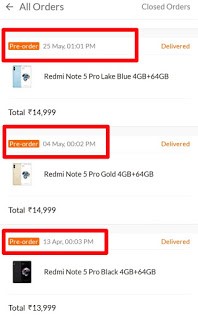
So, friends, it was the my experience on rushing mi smartphones in Flash sale. I have rushed many Xiaomi smartphones like Mi 4A, Mi 5a, Redmi Note 5 , Redmi Note 5 Pro, Redmi Y1 etc.
- Also Read : Digital Seva Portal – CSC : A to Z Full Explained (2019)