CSC(Common Service Centre) is a project under digital India to provide service in rural and remote locations. The services provided by the CSC’s are such as B2C(Business to citizen), health related services, education services, insurance services, bank and aadhaar related services and many more services.
Also Read :CSC digital seva : A to Z Full Explained !!
The services provided in all areas where connectivity of internet is less than another area. So for taking benefits of all the services provided by CSC, first you have to complete the registration process of CSC .
Here I am going to tell you about CSC registration 2019 and how to register yourself on this site for taking benefits of all services provided by CSC. Here are some steps for CSC Registration 2019.
But before, make sure you have kept all of these required documents which are mentioned below !
Basic Documents Required :
A ValidAadhar Card (Must be linkedwith your Mobile No)
Valid Mobile No & Email ID(Create here if you have not )
A valid Pan Card
ABank Passbook
Recent Colour Photos of your shop / Geo-tagged image of both inside & outside
How to Apply CSC Digital Seva Registration in 2019?
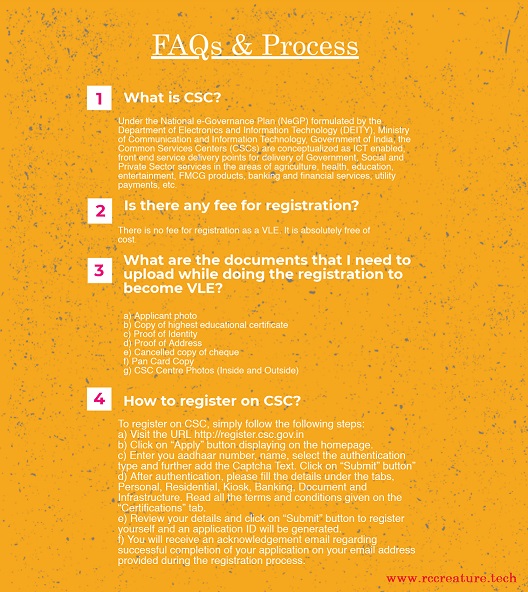
If you are going to register yourself on CSC then first you have to full fill eligibility criteria form which is available on the CSC portal. After this, you can apply for the registration form of CSC.
Here are the full steps for CSC registrationby following you can easily full fill the registration form.
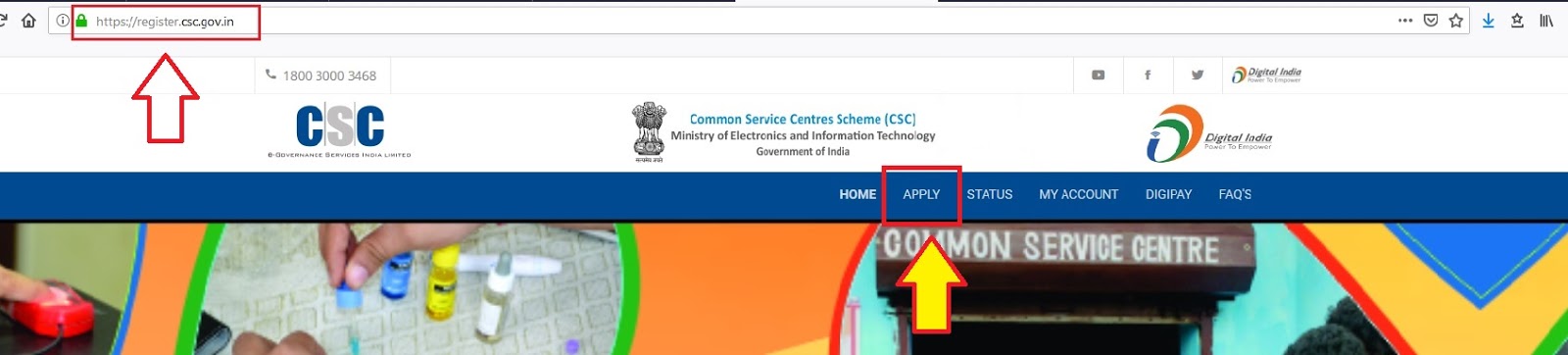
Visit the official Site or Copy & paste this url >> https://register.csc.gov.in
Click on “Apply” button displaying on the homepage.
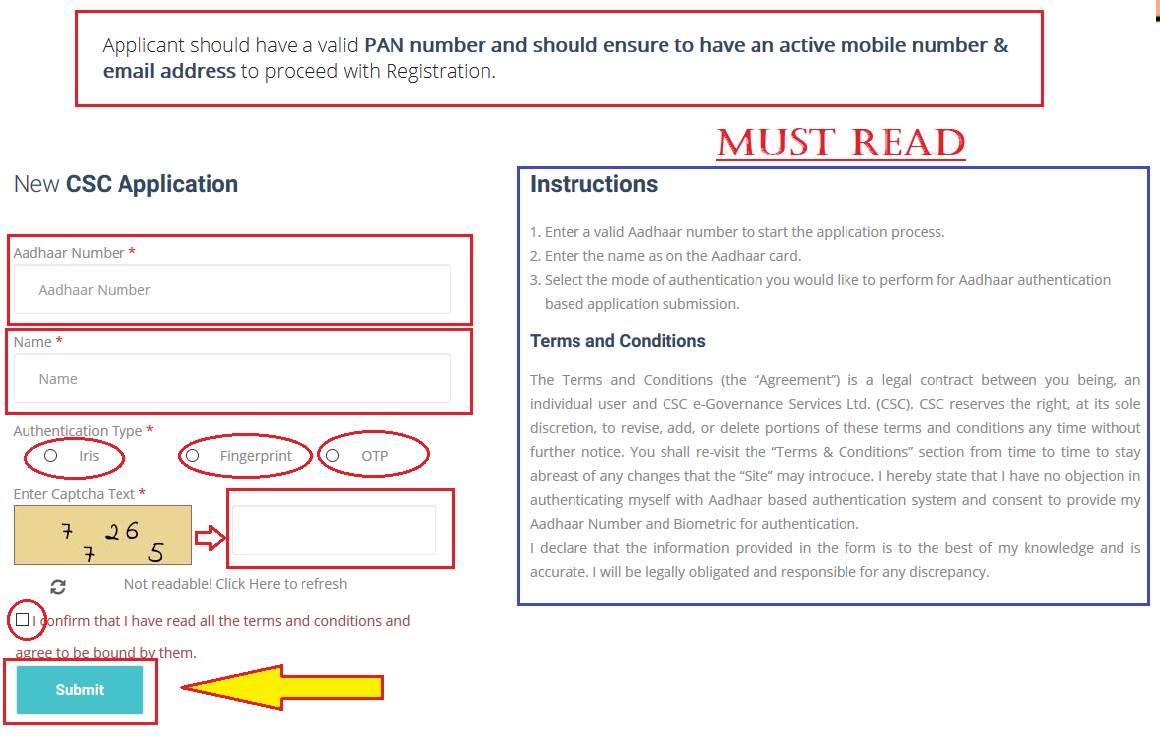
Enter your Aadhaar number & Name .
Select the Authentication type ( You can prefer any of the KYC options likeiris, fingerprinting or one-time passwordif bio-metrics isNOTavailable. ) and fill the Captcha Text.
Now, Click on “Submit” button”
After authentication, please fill the details under the tabs, Personal, Residential, Kiosk, Banking, Document and Infrastructure. Read all the terms and conditions given on the “Certifications” tab.
Next, Review your details and click on “Submit” button to register yourself and finally, an application ID will be generated.
You will also receive an acknowledgement email regarding successful completion of your application on your email address provided during the registration process.
Also Read : New VLE CSC Certificate Download in TWO Steps (2019)
How to Apply CSC Re-Registration 2019 ?
Candidates can also re-register themselves on this portal. It’s same process as you read above for csc registration . Here are steps for the re-registration process. Follow these steps and easily re-register yourself on this portal.
Click on the official website of CSC ( Or, copy paste this link : https://www.csc.gov.in/ )
Enter the aadhaar card number (Remember aadhaar card must be updated )
Remaining steps followed by authentication of your aadhaar number through KYC.
(You can select iris, fingerprinting or one-time password)
After that fill the givencaptcha and click on the submit button.
After completing the authentication process of aadhaar, a form will open.
Then fill all the details mentioned in the form.
Then your new CSC re-registration will be completed.
After this, an acknowledgment/Application number will be given to you for references.
How to Check CSC Registration / Re-registration Status ?
After completing the registration process now comes on how to check registration and re-registration status. For checking the registration and re-registration status,
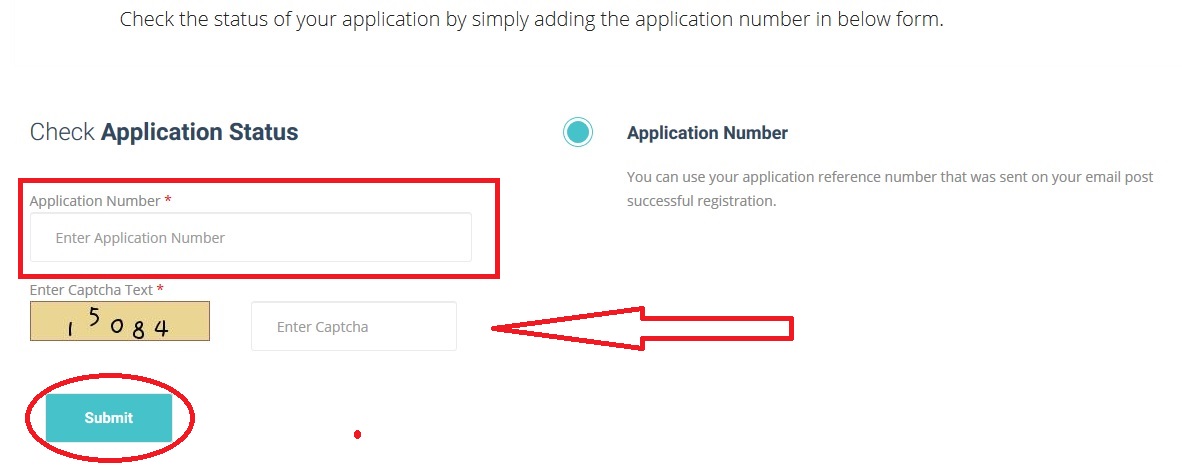
Open this link : https://register.csc.gov.in/register/status
Enter your received Application ID/ReferenceNumberand fill the captcha in the required box.
Click “Submit” option.
Then you will notice your CSC Registration Application Status as written Processing/Successful on your PC/smartphone display !
Or, you may go through this !!
Visit the URL http://register.csc.gov.in
Select “Application Status / Status ”
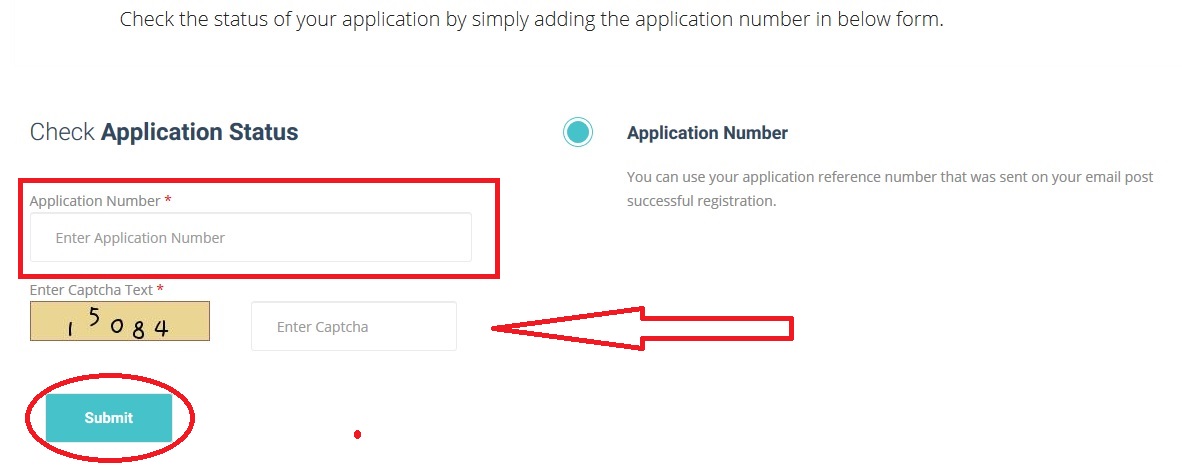
Enter your Application id and Captcha Text And Click on “Submit” button
Important Notice :
=>> There is no fee for registration and re-registration process. So be aware from any of the fake website and person and do not pay any amount to them for registration.
( CSC General FAQs )
=>> If you are applying for registration and your application get rejected, then do not worry you can apply again for registration by following the same procedure.
=>> Also Read : 1. [Video] Passport Seva |Track Passport Status : Complete Guide (2019)
Today, I am going to share all details of CSC digital seva and digital seva portal and its all services provided by it. I know you are here to gain all information and schemes of Digital Seva .So without any late, let’s start it with your regular asked question.
What is Digital Seva ?
Digital seva CSC(Common Services Centre) is an initiative taken by the department of electronics and IT, the ministry of communications and IT, the government of India.
Did You Know ? : Until Now,255798CSC ID’s are registered in687 Districts in our India and approximately4301Applications are rejected !! Isn’t it crazy ? (Check this below image)
Common Service Centers offer various government services through digital seva portal. The main motive is to provide services of the Indian government to rural and remote locations where computers and internet are not available.
They provide multiple transactions at a single location. CSC is a way to deliver compulsory public services like social welfare schemes, healthcare, education, and agriculture services.
What is Digital India ?
Most of the people still don’t know about Digital India. So, I described it in short .
Digital India is a campaign launched by the Indian government to provide e-services of the government to citizens by increasing the connectivity of the internet or by making India digitally empowered in the field of technology.
Also Read : New VLE CSC Certificate Download in TWO Steps (2019)
The step was taken by the Prime Minister of IndiaNarendra Modion 1st July 2015 with the motto “Power to empower”
The motive is to connect rural areas with high-speed internet network. The campaign has 3 main components i.e, the development ofsecure and stable digital infrastructure, delivering government services to citizens digitally and Universal digital literacy.
It is both enable and recipient of another key of the government like BharatNet, Make in India, Startup India, Standup India, Industrial Corridors, Bharatmalaand so on.
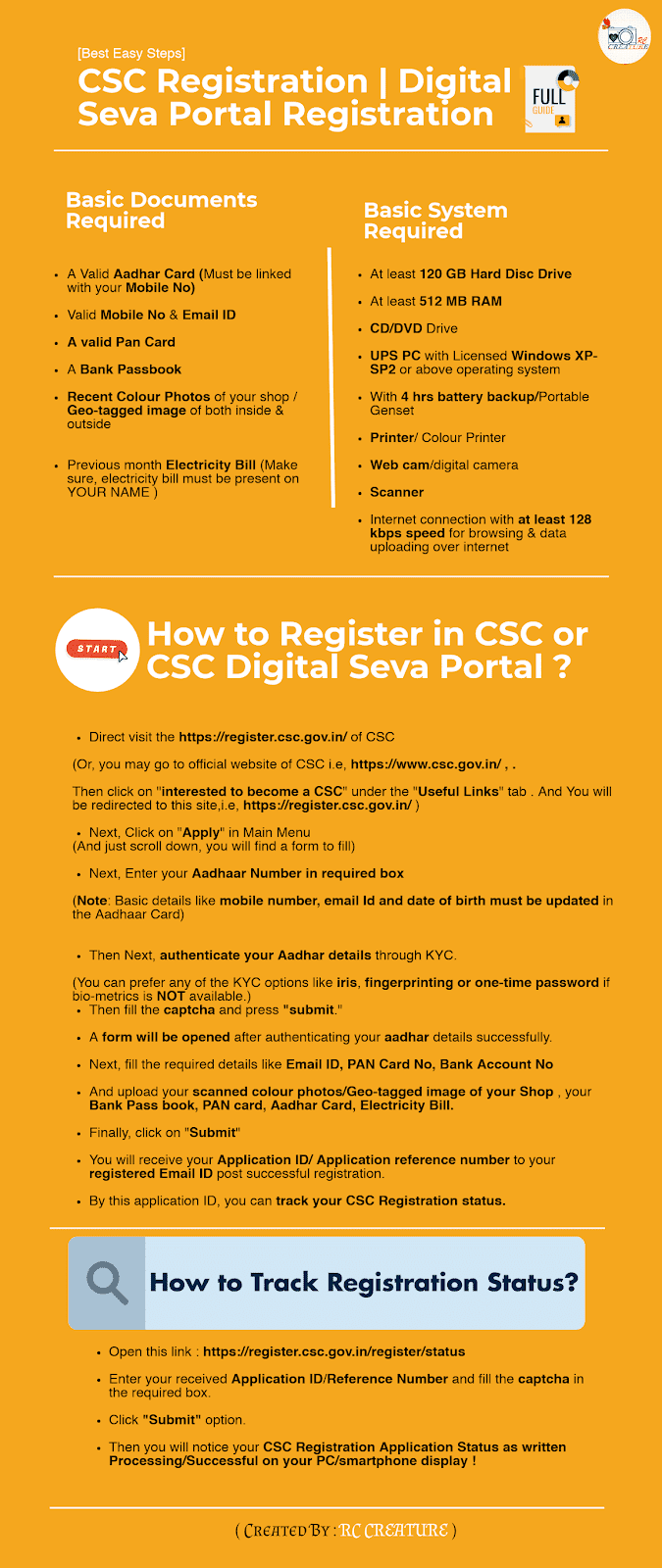
( CSC Digital Seva | CSC Registration (2019) Full Guide : Infographic )
CSC Registration 2019 :
As you knew about Digital India and CSC above, let me tell you that for availing Digital Seva Portal’s services, You must have to register yourself as a CSC . So for New CSC Registration 2019, make sure you have all the basic documents which are mentioned below !
Basic Documents Required :
A ValidAadhar Card (Must be linkedwith your Mobile No)
Valid Mobile No & Email ID (Create here if you have not )
A valid Pan Card
A Bank Passbook
Recent Colour Photos of your shop / Geo-tagged image of both inside & outside
Previous month Electricity Bill (Make sure, electricity bill must be present on YOUR NAME )
Check these following steps for CSC registration now !
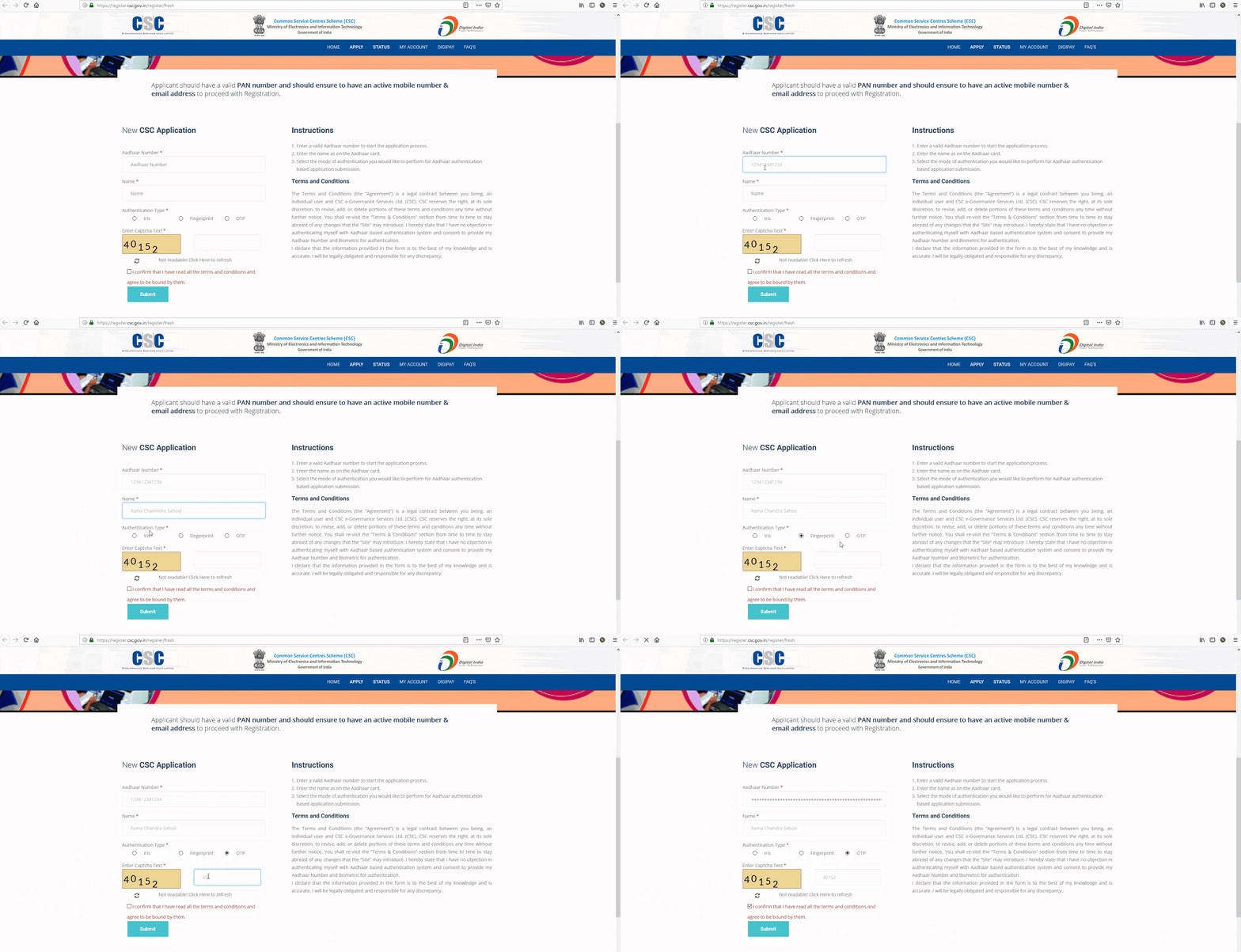
(Refer this GIF for better understand)
(GIF of CSC Registration 2019)
Direct visit the https://register.csc.gov.in/ of CSC
(Or, you may go to official website of CSC i.e, https://www.csc.gov.in/ , .
Then click on “interested to become a CSC” under the “Useful Links” tab . And You will be redirected to this site,i.e, https://register.csc.gov.in/ )
Next, Click on “Apply” in Main Menu
(And just scroll down, you will find a form to fill)
Next, Enter your Aadhaar Number in required box
(Note: Basic details like mobile number, email Id and date of birthmust be updated in the Aadhaar Card)
Then Next, authenticate your Aadhar details through KYC.
(You can prefer any of the KYC options like iris, fingerprinting or one-time password if bio-metrics is NOT available.)
Then fill thecaptchaand press “submit.”
A form will be opened after authenticating your aadhar details successfully.
Next, fill the required details like Email ID, PAN Card No, Bank Account No
And upload your scanned colour photos/Geo-tagged image of your Shop , your Bank Pass book, PAN card, Aadhar Card, Electricity Bill.
Finally, click on “Submit”
You will receive yourApplication ID/ Application reference numberto your registered Email IDpostsuccessful registration.
By this application ID, you can track your CSC Registration status.
Track CSC Registration Status
Open this link : https://register.csc.gov.in/register/status
Enter your received Application ID/ReferenceNumber and fill the captcha in the required box.
Click “Submit” option.
Then you will notice your CSC Registration Application Status as written Processing/Successful on your PC/smartphone display !
Great, you completed your new CSC registration. Hence, let’s look forward to CSC Digital Seva Portal.
What is Digital Seva Portal ?
Digital Seva Portal is a new portal launched by the government of India. With the help of this new portal, it is now much easier to handling and uses named as DSP VLE, Village Level Entrepreneur(VLE).
Who is VLE ?
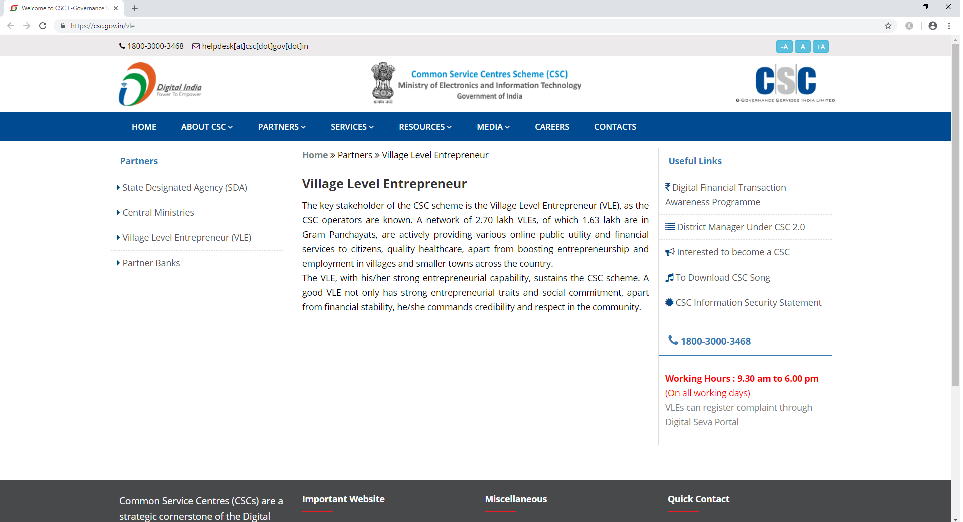
VLE is Village Level Entrepreneurwho delivers various government and non-government services to the end consumers from the CSC outlet(mostly owned).
There is no fee for registration as a VLE. You don’t need any specific training to become a VLE, you just have to take care of minimum requirementsmentioned below.
Eligibility :
Applicant should have a valid Aadhaar number.
Applicant should be a local person
Age of Applicant should be minimum 18 years
Applicant should preferably have passed the 10th level examination from a recognized board
Applicant should be fluent in reading and writing the local dialect and should also have basic knowledge of English language
Prior Knowledge in basic computer skillswould be advantage
Applicant should be motivated enough to be the prime driver of social change and disperse his or her duties with utmost dedication
Required Documents :
Pan Card Copy
CSC Centre Photos (Inside and Outside)
A Cancelled Cheque
Basic System Required :
At least 120 GB Hard Disc Drive.
At least 512 MB RAM.
CD/DVD Drive.
UPS PC with Licensed Windows XP-SP2 or above operating system.
With 4 hrs battery backup/Portable Genset.
Printer/ Colour Printer.
Web cam/digital camera.
Scanner.
Internet connection with at least 128 kbps speed for browsing & data uploading over internet.
What is the Responsibilities as VLE ?
Public place with safety and convenience.
Availability of Kiosk from 08:00 AM to 08:00 PM.
To deliver the services smoothly to the users as available on Digital Seva Portal.
=>> Also Read : [Video] Parivahan Sewa-Sarathi | Apply Driving License(DL) : A to Z Full Explained(2019)
CSC Digital Seva Portal Registration 2019 :
It is easy to register on digital seva portal. Here are the easiest steps about the registration process which helps you to register yourself on this portal easily.
Visit the official website of digital seva portal: CSC
Now click on the registration option in the menu and click on the apply button displaying on the homepage of the website.
Now enter your Aadhaar details and choose your authentication type, fill the captcha given below after that click on the submitbutton.
After the submission of your registration form your aadhaar information, aadhaar authentication will be displayed on the screen along with the form.
Please fill all the details under tabs, banking document, and infrastructure.
After that, review your details carefully and click on the submit button and your application will be generated.
After completion of this process, you will receive an email/SMSregarding the successful completion of your application on your registered email id/ mobile number.
By email/ SMS you will get an application number. Through this application number you can track your application status.
How to check Application Status ?
If you want to check your application status then you have to visit on the official website of the digital seva portal and click on the application menu and select application status.
After that fill your application id and captcha text and click on the submit button and now you can track your application status.
Services Offered by Digital Seva Portal :
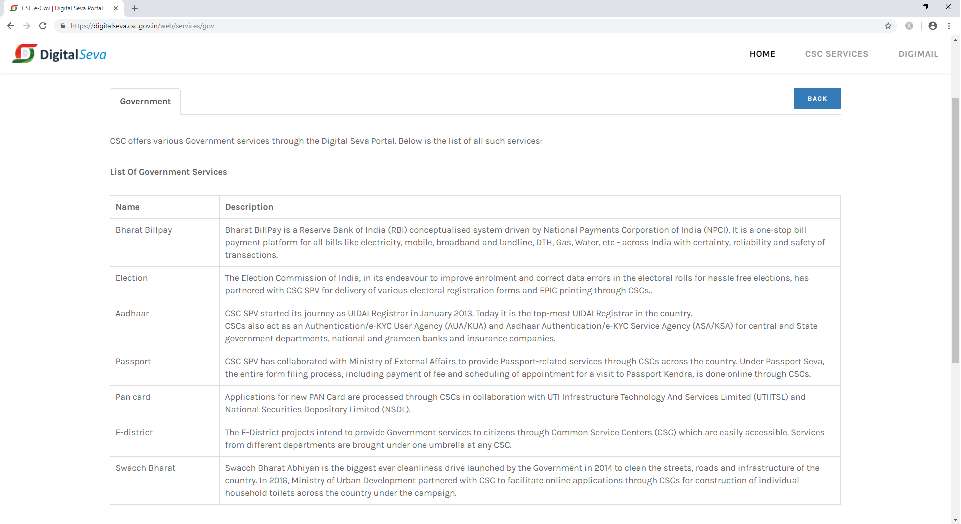
There are various services provide by figural seva portal in many streams like services related to Aadhaar, Agriculture, Banking and Pension, Education, Election, Government, Health, Insurance, and other services.
So let’s take a quick look on these services below !
1. Aadhaar :
Aadhaar Demographic Update
Digital seva portal provide many services related to aadhar, Aadhaar Demographic Update is one of them.
Demographic details means basic personal detail of an individual like name, date of birth, gender, address. Using this service you can update/ change your demographic details.
Check this official video guide :
Aadhaar Mobile Update
By using this service you can update your mobile number in aadhaar card. For this you have to visit the official website of CSC 1st . And For more check this below video.
Check this official video guide :
Best finger detection
Digital seva portal also provide this service to update your bio-metric details in aadhaar. Aadhaar bio-metric authentication is based on the fingerprint analysis.
Also Read :Download Eaadhar | Check Aadhar Card Status & Update Aadhar Card [FAQ] (2019)
2. Agriculture :
Farmer Registration
Farmer registration service is provided by digital seva portal for farmer registration on portal. By using this service farmers can take advice from experts in agriculture related issues. These experts will be given by our government at state and centre level.
It is the first agro-estore in India. The store contains bio pesticides seeds, fertilizers, insecticides, tissue-culture, green house, irrigation system for farmers.
3. Banking and Pension :
RAP Registration
Rural Authorized Person(RAP) is an individual who has a license to negotiate insurance policies on behalf of insurance companies with a client.
Check this official video guide :
You can register for RAP through this for this you need copies if your documents like address proof, photo id proof, PAN card and education process. Registration fee is Rs 350 for individual.
Pin Pad Device Service Payment
Pin pad is a electronic device that used for card based transactions. User can use their debit card, credit card and smart cards for transactions. Nowadays this device is available on many stores, supermarkets, malls.
4. Education :
SCLM Admission
Student Lifecycle Management(SCLM) section provide information on user management in the SCLM portal.
This portal uses authentication and administration mechanism of users provided by SAP Net weaver gateway platform. By using this service, students can register themselves on this portal and manage their profiles using the data services provided by SAP.
Tally Certification
This program is available for candidates by digital seva portal. Any candidates who want to learn tally can apply for this course.After completing their course, they can get their certificate.
5. Election :
The program is about to improve enrollment and correct data errors in the electoral rolls. For this, Election Commission has partnered with CSC SPV for deliveryof various electro registration forms. Now electoral registration management system of Punjab, Uttarakhand, Meghalaya , and Rajasthan have been integrated with digital seva portal.
Check this official video guide :
6. Government :
Birth and Death Application
The program is for the registration of death and birth certificate of every person.
To apply for birth and death certificate, candidate needs to visit the CSC center and fill the application form of death/birth certificate and attach the specified documents along with the application form.
7. Online FIR :
CSC provide many programs to citizens, Online FIR is one of them. If you want to report a FIR online then first you have to visit the official website and then click on the complaints option and then file aFIR/complaint according to you.
8. Ration Card Services :
The CSC also provide ration card services. For this you have to visit on the official website of digital seva and choose the option according to you like if you want to apply for ration card, then choose the apply option and fill the details and submit the application form.
9. Health :
Telehealth Consultations
Like others this program is also provided by Common service Centre.
The program offers video based tele consultation service all over India. In 2014, CSC SPV partners with Apollo hospitalsfor tele consultancy.
Check this official video guide:
But in 2016, CSC SPVlaunched its own health consultancy services which includes allopathic, homeopathic and ayurvedic doctors from all over the India.
Pradhan Jan Aushadhi Registration
Pradhan Jan Aushadhi program is mainly for people who can not afford costly medicines.
The motive of this program is to provide quality medicine at affordable prices. The program is launched by the Bureau of Pharmaceutical Public Sector Undertaking(BPPI).
CSC SPV partners with BPPI to setup medical stores all over the India under Jan Aushadhi Yojna.
10. Insurance :
Pradhan Mantri Fasal Bima Yojana
Pradhan Mantri Fasal Bima Yojana was launched on 14th January 2016 by the government of India.
The motive of this program to reduce agriculture distress for farmers welfare with our affecting the actual price of agricultural products.
Check this official video guide :
Farmer’s Package Policy
This policy is designed for take care of the insurance needs of the farmers. This policy covers personal assets if the farmers like dwelling and its contents against fire and theft. This helps them to earn their likelihood.
11. Others
Swachh Bharat Abhiyaan
Swachh Bharat Abhiyan is the cleanliness campaign launched by the government of India in 2014.
The motive of this campaign to keep our country, city and house clean. Ministry of urban development partnered with CSC for construction of household toilets all over the country.
During 2016-17 around 5.6 lakh applications for household toilets were submitted through CSC network.
The motive is to build affordable houses for urban areas people. The MoU is signed between Ministry of Housing and Urban Poverty Alleviation(MHUPA) and CSC SPV for receiving applications through CSC network.
Around 28 lakhs application were submitted through CSC network during 2016-17 under this scheme.
What is Digital Seva Connect ?
It is a secure authentication for connecting users to services provided by digital seva portal. For this you have to register yourself in portal and after that you can enjoy all the services provided by digital seva portal.
Click here to login Digital Seva Connect directly !!
What is Digital Seva Kendra ?
Digital seva kendra is a access point to deliver various government services to citizens. They provideservices in various streams like aadhaar, banking, health, insurance, education and so on.
What is Digipay ?
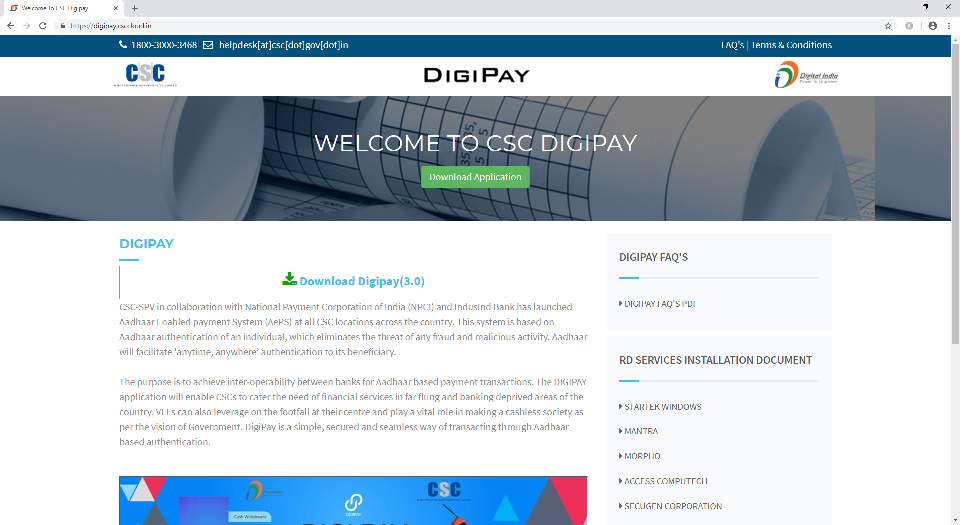
It is an aadhaarenabled payment system launched by Indusland bank at all CSC locations across India. The system is based on the authentication of aadhaar of any person.
A secure way of payment which eliminates the threat and any malicious activity. Using digipay you can do the only aadhaar enabled transactions.
How to login Digipay ?
Digipay is used for aadhaar based transactions at CSC locations. So the question is how to login to digipay.
For this you have to signup in digipay and then you can easily log in to digipay by entering your id and password in login menu and click in the submit button.
Finally, I shared the full details of the Digital Seva Portal. I also shared the services provided by the CSC digital seva . It is really great for us and CSC is really helping us in our daily life.
Hope this article helped you lot . Do let me know if you have any doubts or questions regarding digital seva portal and its services in comment box below !! Thank You !!!